Flag

We stand with Ukraine and our team members from Ukraine. Here are ways you can help

Get exclusive access to thought-provoking articles, bonus podcast content, and cutting-edge whitepapers. Become a member of the UX Magazine community today!

Home ›› Accessibility ›› A Beginner’s Course in Elevator Operation #wtfUX?

A Beginner’s Course in Elevator Operation #wtfUX?

by Josh Tyson
3 min read
Share this post on
Tweet
Share
Post
Share
Email
Print

Save

Roger Dooley, author of Brainfluence, has a confusing interaction with a high-tech elevator system.

This tale of lifting one heavy cognitive load come from Roger Dooley’s post “Don’t Redesign Your Elevator!” on his Neuromarketing blog. It describes his first encoutnter with a Schindler ID System Elevator control installation in an modern German hotel. “Each new guest had to be walked to the elevator for a training session on how to get to one’s floor.”

The elevators are arranged in a circle around a little lobby—very attractive and ultra-modern. To get inside the elevator lobby from a guest floor, though, I have to get through a heavy glass door. It’s locked. Maybe to prevent a cat burglar who rappelled to the 28th floor, broke in through a window, and now planned to make a quick exit via the elevator? I wave my RFID room key at various objects to no effect. Finally, I notice on the wall opposite the door handle there’s a button that says “unlock door.” I push it, and quickly open the door. (I guess the cat burglar could have pushed the button too. Hmmm. Maybe its purpose is to keep really short people away from the elevators?)

The elevator lobby has none of the traditional “up” or “down” buttons. Rather, there’s a little kiosk with a keypad and a display. To use the keypad, though, you have to swipe your room key next to a sensor. But where’s the sensor? There’s no label, nothing to indicate which spot you have to get close to—I figured it out by watching a bellhop do it. There’s no beep or other feedback when you identify yourself to the elevator brain—you know it worked only if you can use the keypad.

Schindler ID elevator

Once the elevator brain decides you have authorization to request an elevator, you key in the number of your destination floor. The display gives you a letter code for your assigned elevator. When you enter the car, you find no floor buttons at all. Your pre-selected floor is displayed on a little panel by the door. Don’t even think about, say, stopping at the reception floor once you’ve boarded—you made your decision at the kiosk, and any itinerary changes will have to wait until arrive at your programmed destination.

Oddly, even exiting the elevator lobby requires a key card. Since activating the kiosk requires one too, if you somehow got into the lobby without a card (say, if you went in as someone was leaving), you’d apparently be trapped.

While the idea of a programmable elevator system certainly has appeal from a security standpoint, the complexity it presents to hotel guests doesn’t seem worth the payoff. Sometimes it really is better to keep things simple, so long as you don’t make simple mistakes like this one sent in by Kevin Cropper, showing a panel with the same open-door icon used next to the door open and door close buttons.
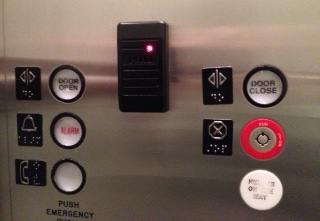
double door open icon

Keep these coming. Send them to us via Twitter or Facebook using the hastag #wtfUX or email them to: [email protected] with “#wtfUX” in the subject line. Include as much context as you can, so we get a full understanding of what the f%*k went wrong.


post authorJosh Tyson

Josh Tyson
Josh Tyson is the co-author of the first bestselling book about conversational AI, Age of Invisible Machines. He is also the Director of Creative Content at OneReach.ai and co-host of both the Invisible Machines and N9K podcasts. His writing has appeared in numerous publications over the years, including Chicago Reader, Fast Company, FLAUNT, The New York Times, Observer, SLAP, Stop Smiling, Thrasher, and Westword. 

Tweet
Share
Post
Share
Email
Print

Related Articles

Forget linear workflows — today’s creative process is dynamic, AI-assisted, and deeply personal. Learn how to build a system that flows with you, not against you.

Article by Jim Gulsen
The Creative Stack: How to Thrive in a Nonlinear, AI-Assisted World
  • The article explores the shift from linear to nonlinear, AI-assisted creative workflows.
  • It shares practical ways to reduce friction and improve flow by optimizing tools, habits, and environments.
  • It argues that success comes from designing your own system, not just using more tools.
Share:The Creative Stack: How to Thrive in a Nonlinear, AI-Assisted World
7 min read

How is AI really changing the way designers work, and what still depends on human skill? This honest take cuts through the hype to show where AI helps, where it falls short, and what great design still demands.

Article by Oleh Osadchyi
The Real Impact of AI on Designers’ Day-To-Day and Interfaces: What Still Matters
  • The article explores how AI is reshaping designers’ workflows, offering speed and support across research, implementation, and testing.
  • It argues that while AI is useful, it lacks depth and context — making human judgment, critical thinking, and user insight indispensable.
  • It emphasizes that core design principles remain unchanged, and designers must learn to integrate AI without losing their craft.
Share:The Real Impact of AI on Designers’ Day-To-Day and Interfaces: What Still Matters
9 min read

What if you could build software just by talking to your computer? Welcome to vibe coding, where code takes a back seat and the vibe leads.

Article by Jacquelyn Halpern
Vibe Coding: Is This How We’ll Build Software in the Future?
  • The article introduces vibe coding, using AI to turn natural language into working code, and shows how this approach lets non-coders build software quickly and independently.
  • The piece lists key tools enabling vibe coding, like Cursor, Claude, and Perplexity, and notes risks like security, overreliance on AI, and the need for human oversight.
Share:Vibe Coding: Is This How We’ll Build Software in the Future?
7 min read

Join the UX Magazine community!

Stay informed with exclusive content on the intersection of UX, AI agents, and agentic automation—essential reading for future-focused professionals.

Hello!

You're officially a member of the UX Magazine Community.
We're excited to have you with us!

Thank you!

To begin viewing member content, please verify your email.

Tell us about you. Enroll in the course.

    This website uses cookies to ensure you get the best experience on our website. Check our privacy policy and